
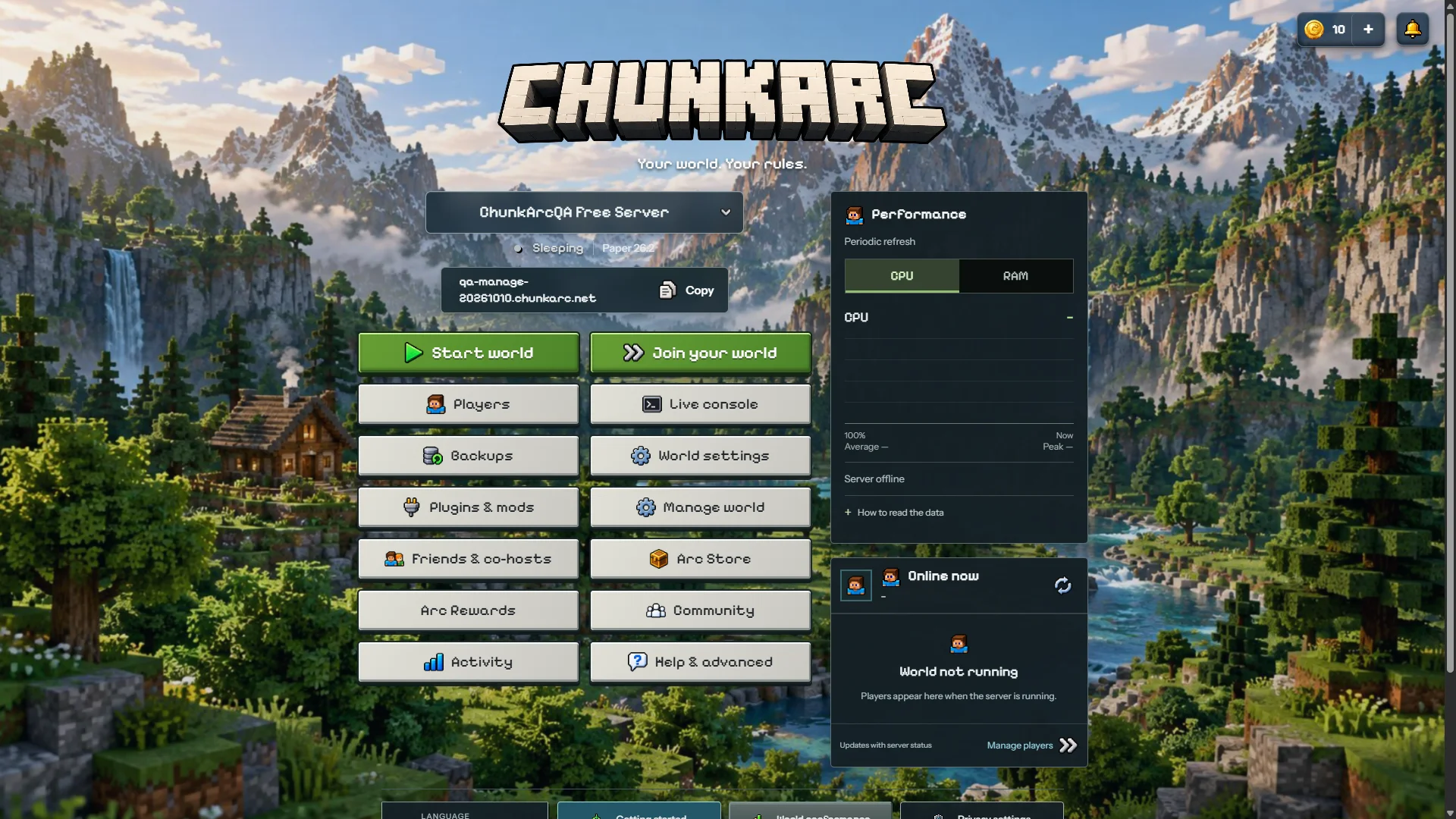
To make a free Minecraft Java server, open the ChunkArc panel and its world creation form. Choose Minecraft Java, select supported software and a version, claim your name.chunkarc.net address, then use the world’s start control in ChunkArc Manage. No port forwarding or credit card is required for the Free Beta.
Before your first join
- Wait for provisioning. The panel prepares the files for the software and version you chose. The first setup can take longer than later starts.
- Start the world and check the console. Wait until the startup finishes before trying to join. The Console is the reliable place to see install or startup errors.
- Join with your custom address. In Minecraft Java Edition, add name.chunkarc.net to Multiplayer and connect. Share that address with friends instead of the node IP.
- Expect a short wake-up when sleeping. Free Beta servers stop after 15 minutes with no players. A real player connection wakes the server automatically, and the first join may take a moment while it boots.
1. Sign in to ChunkArc
Use the Create Server button on the website, then sign in with your panel credentials, Google or Discord. You can also join the ChunkArc community and start through the bot. Every method leads to the same panel and the same Free Beta rules.
2. Open the world creation form
With a new account, open Create your first world and select Minecraft Java. If you started in Discord, use the Create Free Server button in Start Here. The Discord flow may ask for a quick one-time browser verification before it creates anything; this protects the Free Beta from automated abuse and does not ask for your password.
3. Choose the right software
Open Software and version to review the available choices. Match the Minecraft version your friends will use. A Java server is not automatically compatible with Bedrock players: for Bedrock, use the separate game choice or a supported cross-play setup.
- Paper: the safest default for most small plugin servers.
- Purpur: Paper-compatible with more gameplay configuration.
- Fabric: for Fabric mods and lightweight modded setups.
- Folia: only for software specifically compatible with region-based multithreading.
For a first server, Paper is usually the right choice. Read the software comparison, the focused Paper vs Purpur guide, or Paper vs Folia before changing the base later. If you choose Paper or Purpur, follow the safe plugin installation guide after the first start.
4. Enter your server details
Your ChunkArc account and Minecraft username are separate. Enter the Minecraft username that will play on the server, then choose the public address. In the Discord bot flow, use an email address you control so you can set or reset your panel password; it does not need to match the email stored on Discord.
5. Pick your custom address and location
Choose only the first part of your address. For example, entering myworld creates myworld.chunkarc.net. Use letters, numbers and hyphens, and avoid names that impersonate ChunkArc, staff or other brands.
Your first address is selected during creation. Later changes use Arc Coins or a paid change when payments become available.
Choose an available server location near most of your players. Read the Free Beta limits and anti-abuse rules, then confirm the required acknowledgements, including the Minecraft EULA. Complete the human verification before submitting. If the form reports an error, correct the indicated field and check whether a world has already appeared before submitting again.
Because ChunkArc hosts the server for you, you do not need to configure router port forwarding or expose your home connection.
See the Minecraft controls
6. Start and join
When the server says it is ready, open Minecraft Java Edition, choose Multiplayer, then Add Server. Enter your custom address with no port. This guide creates a Java server. Selecting a Bedrock address in your client will not make a Java-only server compatible.
If something does not work
- Server starts but you cannot join: check the edition, address and game version with the connection checklist.
- A plugin fails at startup: use the plugin error checklist; reinstalling the whole server should not be the first step.
- A friend is rejected by the whitelist: add their Minecraft username using the whitelist commands and access guide. Keep operator access separate from permission to join.
Check the public platform status first. For account, startup or connection problems, open a Discord support ticket and include your server address plus the relevant Console error. Never post your password, API keys or recovery codes.
Before adding a large plugin or mod collection, use the Minecraft server RAM guide. If you are using Fabric, follow the Minecraft server mods guide for loader and client compatibility steps. To make a permanent-death world, follow the Hardcore mode guide.
Common setup questions
Do I need Discord to create a server?
No. You can sign in from the website with your ChunkArc credentials or Google. Discord remains available for community features, referrals and private support tickets.
Do my friends need a ChunkArc account?
No. They only need a compatible Minecraft Java Edition client and your custom server address.
Why does the first start take longer?
Initial provisioning installs the selected software. The first world start may also need to generate terrain; later starts load the existing world. Wait for the Console to report that startup is complete before joining.
Why did my free server stop?
Free Beta servers stop after 15 continuous minutes without players. A real player connection wakes the server automatically; server-list pings alone do not keep it running.
Create your first world
The Free Beta includes a custom address and world management controls, with no credit card required.
Create a free server